Quantity-first
COTS parts arrive as bins, lots and purchase lines. ARCHITECT keeps aggregate inventory; lot, condition and serials stay optional.
SystemsBuildPrivate alpha · Windows
COTS ARCHITECT
ARCHITECT turns aggregate COTS inventory into validated builds, the support they need, RF evidence and a concise technical handoff. It runs offline, keeps every organisation in its own workspace, and never invents an aircraft, radio or specification.
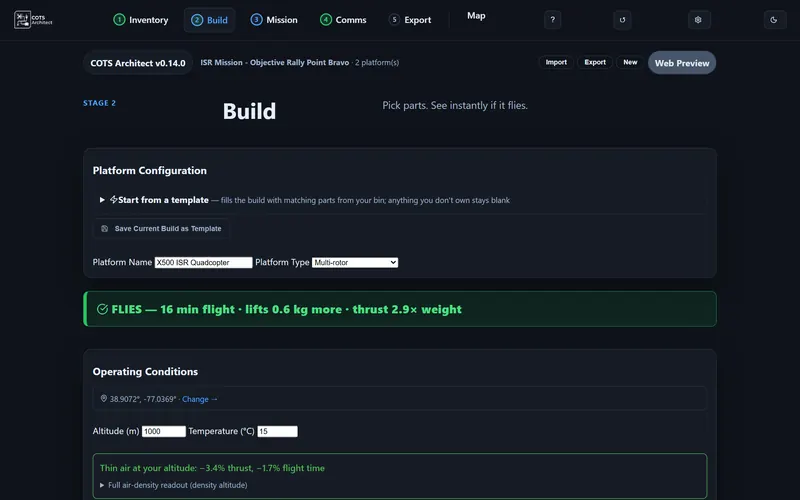
COTS ARCHITECT · screen recording
The app with its sample project: it tells you a build flies, what it takes to support, and blocks the handoff when one aircraft cannot fly.
Five stages
Work left to right. Each stage carries the selected UxS forward without turning the tool into another planning burden.
Imports messy CSV and Excel lab inventories without dropping uncertain rows. Scored classification with review and reclassification.
Assembles complete UxS and operator kits from parts actually in the lab. Checks physics, endurance and compatibility.
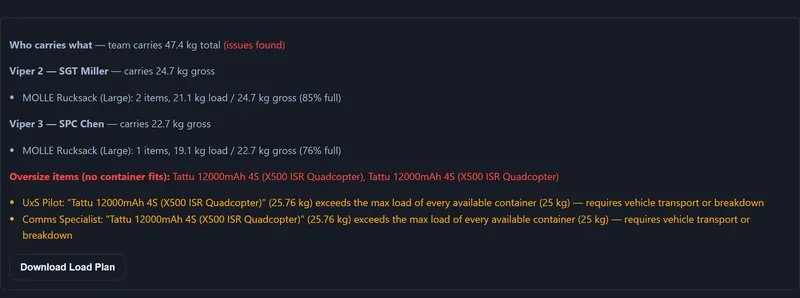
Batteries, charging, spares, loads and resupply for the operating window. Focused support planning, not MDMP replacement.
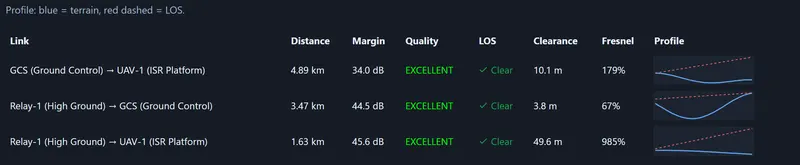
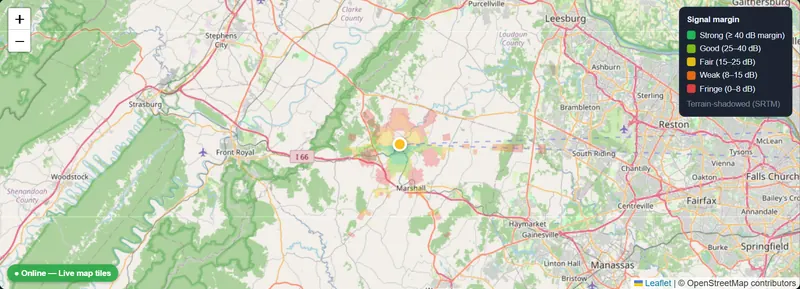
Places saved assemblies in the AO. Separate control, video and data link budgets. Terrain LOS, Fresnel and margins.
Packages only the selected UxS and its evidence: build snapshot, support products, RF annex and checks.
RF check
A saved build carries its controller, receiver, VTX, data radios and fitted antennas into directional link checks over terrain.
Product behaviour
The tool shows what is incomplete and where to fix it, instead of hiding the reason behind one score.
COTS parts arrive as bins, lots and purchase lines. ARCHITECT keeps aggregate inventory; lot, condition and serials stay optional.
Inventory, builds, support, RF analyses and handoffs stay with the active organisation and never cross between them.
The package contains the chosen UxS and its evidence. It doesn’t disclose the organisation’s entire lab.
Status and deployment
A local Electron application backed by explainable physics, support and RF rules. Customer data stays on the operator’s computer.
How to get it
ARCHITECT is not a public download yet. Tell us about your lab and we’ll send the Windows installer, or set up an evaluation with your own inventory.
Put ARCHITECT on the lab laptop, work offline, and hand a UxS support package to the rest of the team.
New builds
One short note per release, with the download link. Reply to stop.